PERF-GS
3D Gaussian Splatting in 10 seconds on an RTX 4090
Efficient, extensible, cross-vendor, dependency-free & low VRAM differentiable training
Stump trains for 10.15 seconds in this recording, followed by a free-camera orbit. From opening the scene to the trained result took 13.90 seconds.
Nine-scene Mip-NeRF 360 averages
- Ultrafast training loop
- 10.51 s
- RTX 4090 · 3,000 steps
- Quality reconstruction
- 27.90 dB
- RTX 4090 · 22.68 s
- Quality+ reconstruction
- 28.227 dB
- RTX 4090 · 122.66 s
Overview
The goal was allowing hundreds of experiments in a day on a single consumer GPU. On our RTX 4090, Ultrafast preset runs the whole nine-scene Mip-NeRF 360 dataset in 94.6 seconds. Loading the photos, initializing the splats, scoring the held-out views and exporting the model take some minimal additional time.
Trainer design
Trainer architecture
We use SlangPy to write the training schedule in Python, the backend gpu dispatching using SlangPy and the kernels in Slang. Python picks a training camera, sets learning rates and decides when to grow the model (frontend training loop/setup), SlangPy compiles and caches each shader entry point for the session, then dispatches it through its Python RHI. There's no separate native extension to build.
Slang autodiffs the math for one splat/primitive, while we write the backward pass that accounts for how overlapping splats combine into a pixel. A primitive defines its projection, coverage and color. Mark its projection and coverage functions as differentiable, and Slang generates their derivatives from the same source. The compositor blends the contributions. The disk primitive in our tests uses the same blend loop with its own coverage function. Primitive interfaces · Disk primitive test
Vulkan is the cross-platform target, and D3D12 on Windows uses the same shader sources. Training has no CUDA or PyTorch dependency, but it is totally possible to interop with PyTorch and other frameworks. We've run Vulkan training on Windows with the Nvidia RTX 4050 Laptop GPU, RTX 4080, RTX 4090 and AMD Radeon RX 7900 XT. Linux and macOS are unverified, yet.
Initialization
COLMAP gives us camera poses and the initial sparse point cloud. Its color initializes the constant spherical harmonic coefficient, its opacity starts at 0.1, and its initial scale comes from the root-mean-square distance to its three nearest neighbors. That lets a dense patch of points start with smaller splats than a sparse one.
We also seed geometry between those points. We take up to 28 anchor photos from the training split, rectify stereo pairs and match them in both directions. We then triangulate matches that agree left-to-right and right-to-left, then check where the 3D point lands in a third training photo. We keep it if the color agrees and this adds up to 256,000 splats in places the sparse reconstruction may barely have sampled, which helps speeding up initial convergence.
Taking inspiration from PPISP, for a single-camera reconstruction we fit one radial falloff strength during setup and apply it when rendering. Otherwise the trainer uses a flat response. Stereo initialization · Lens fit
Forward passes
One ordinary step records the forward render, image loss, backward passes and Adam update in one GPU submission. After growth, we reorder splats along a Morton curve so nearby splats sit together in memory. At the start of a view the GPU can then cull an off-screen cluster of 128 splats with one bounding-box test.
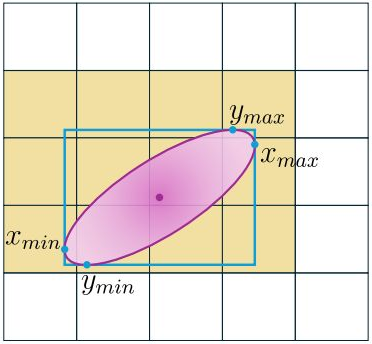
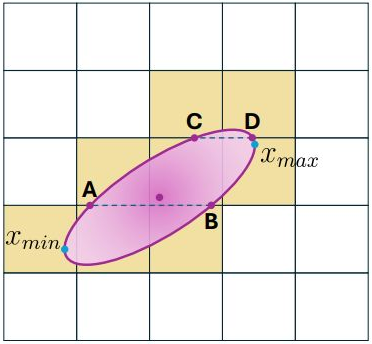
The renderer projects each surviving Gaussian to an ellipse, counts the 8 × 8 pixel tiles it overlaps, and evaluates its view-dependent color if it touches the image. We bound the ellipse at the opacity cutoff, then walk the rows or columns of that box to find the tiles the ellipse crosses.
We use Mip-Splatting here. The training cameras set a 3D smoothing scale for each splat, and a 2D filter widens small projected footprints while compensating their opacity.
A large splat can touch many tiles. Sorting a depth key for every copy would repeat a lot of work. We sort splats by depth once per view, emit the splat–tile pairs in that order, then do a stable GPU radix sort on just the tile ID. Each tile gets a front-to-back list. The blend skips alpha below 1/255 and stops a pixel once its remaining transmittance falls below 0.0001. The loss compares the render with the training photo using pixel error and SSIM. The SSIM shader filters each 11 × 11 neighborhood first along rows, then along columns. Rasterizer · SSIM shader
Backward passes
Many pixels can see the same splat. If each pixel writes its own update, those writes compete for the same gradient in memory. Building on TamingGS, we give each GPU lane one splat within a tile. The lane adds up that tile's pixel contributions in registers, then writes the total for its splat.
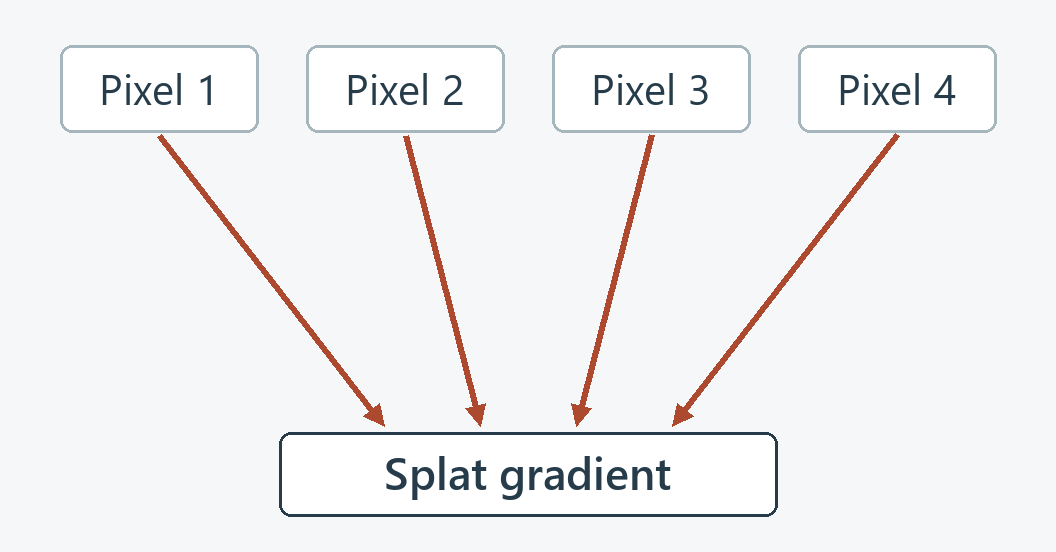
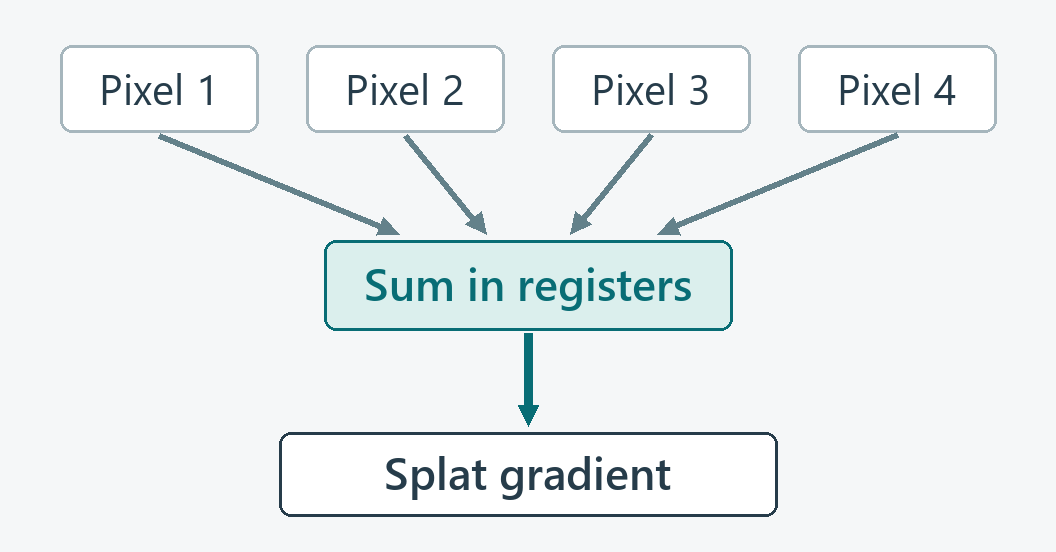
Each splat's contribution depends on what the splats in front of it have already blended. Every 32 splats in a tile, the forward pass saves each active pixel's accumulated RGB and remaining transmittance. An indirect dispatch schedules the groups reached by at least one pixel. Within each group, lanes use the saved values and wave operations to reconstruct the blend in front of their splat.
From a talk I gave (slides available soon, hopefully)
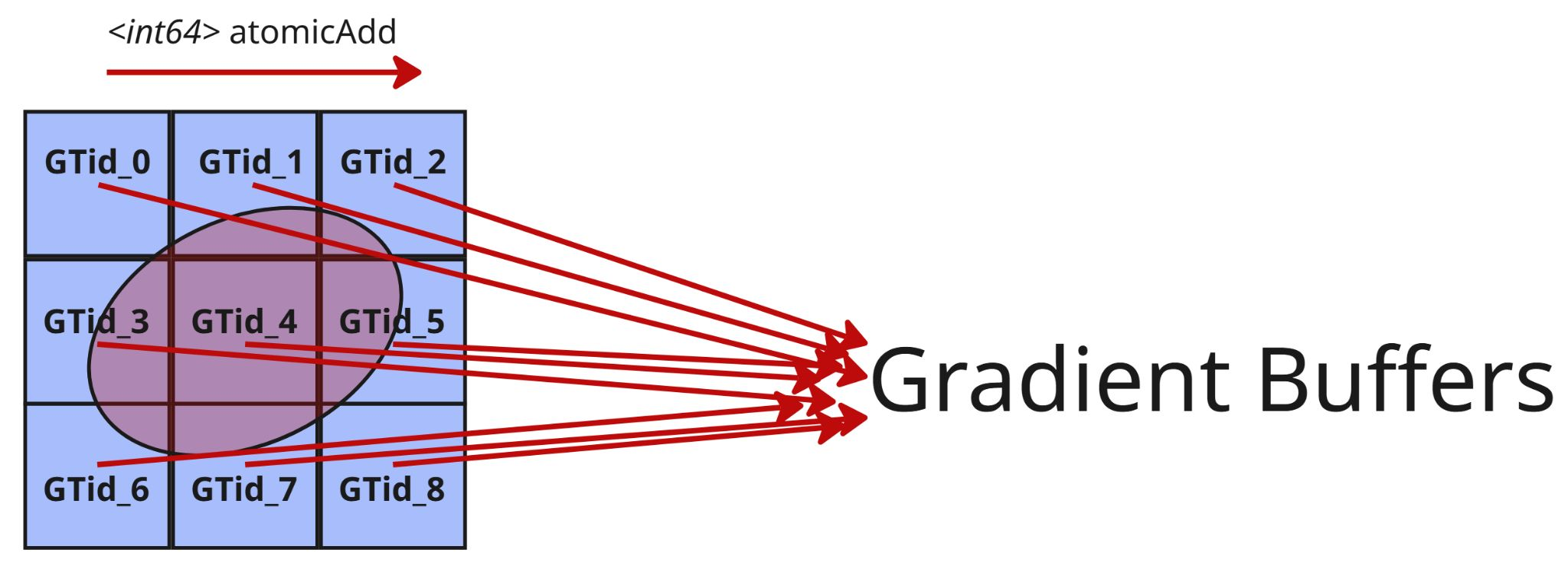
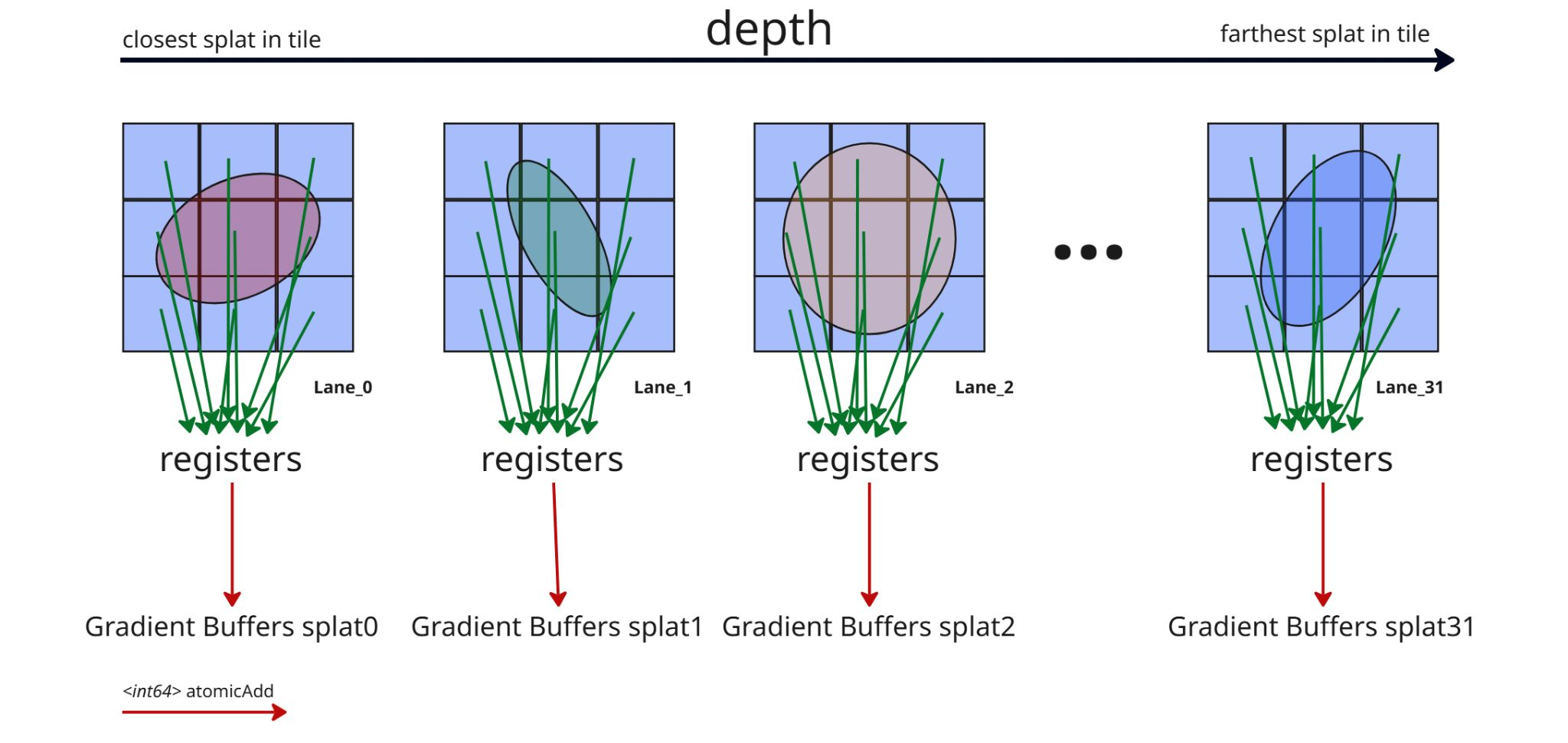
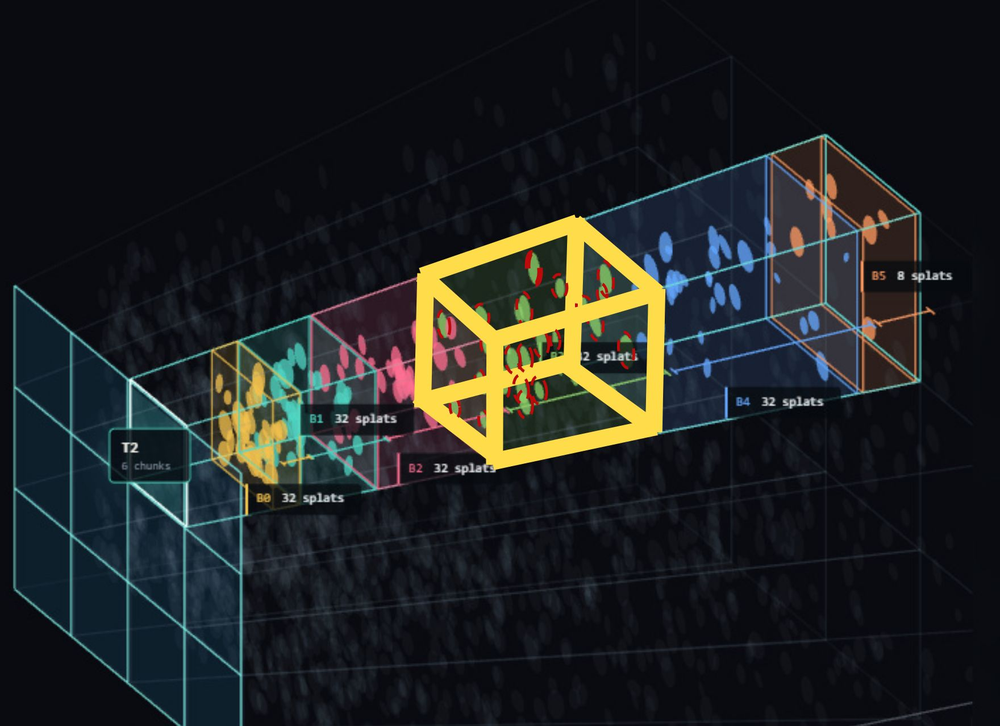
Once those contributions have been summed across tiles, a separate pass differentiates the projection once per contributing splat. Another pass handles spherical harmonic color and its dependence on view direction. Adam updates the parameters in 32-bit float (and we use int64 atomics for better cross-platform compatibility). Its two running moments are stored in bfloat16 with stochastic rounding, which halves the storage for those moments and lets small updates accumulate. Blend backward · Projection backward · Adam precision
Densification
How small does a splat need to be to represent the detail in a photo? We use a modified version of SAD-GS to answer that question for each of the splat's three axes.
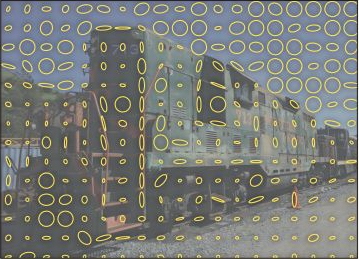
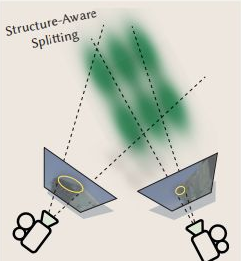
During growth, every tenth step samples a structure tensor built from RGB gradients in the training photo to estimate the local image frequency. We project each of the splat's axes into that view and compare its length with the scale of the image detail. If the projected axis is longer than the estimated wavelength of that detail, the view votes to split that axis. We accumulate votes across cameras.
Every 500 steps during growth, a splat can split if over 64% of its eligible observations vote for more detail and its screen-position loss gradient is large enough. Depending on which axes need subdivision, one parent can become two, four or eight children. On the intervening 100-step growth updates, we use an AbsGS-style update driven by accumulated screen-position gradients. Small splats with a large gradient can be cloned and larger ones can split. Growth updates can also prune splats with low opacity or little accumulated blend weight. With Quality's 4M cap, proposed splits can outnumber the free slots. We rank expansions by the parent's average screen-position gradient divided by the proposed family size and give space to whole families, strongest axis first. Structure scoring · Split allocation
Presets
All four presets use the renderer and growth rules above, but we change how many pixels and splats get work, where the photos live, and how long we keep refining. The timings and held-out PSNR below are means over the nine Mip-NeRF 360 scenes on the RTX 4090, with equal weight per scene.
Ultrafast
A spatiotemporal blue-noise mask picks a quarter of the pixels for the backward pass, scales their gradients by four, and advances on the next visit to that camera, while SSIM still sees the full neighborhood. Degree-2 spherical harmonics and 3,000 steps gave 10.51 s at 27.13 dB.
To isolate sparse pixel sampling advantages, run Ultrafast twice on the same scene and seed. Set --stbn-pixel-fraction 1 on the second run. You get full pixel supervision with the same growth cap, color model and GPU image cache.
Balanced
Balanced runs for the same 3,000 steps with the same degree-2 color model, and uses every pixel for supervision. It's the default. It allows up to 2.6M splats and grows through step 1,900. We stream the current photo from RAM into a mapped GPU texture and compute its structure map when needed. On Bicycle alone, caching all 169 training photos takes 656 MiB of packed pixels and their structure maps add another 1,311 MiB before texture padding. Reusing those textures is how Balanced fits more splats in less VRAM than Ultrafast. It averaged 15.91 s at 27.40 dB, with 2.81 GiB of GPU memory at loop end versus Ultrafast's 5.29 GiB.
Quality
Here we still stream the photos and use every pixel. Moving from degree-2 to degree-3 spherical harmonics gives each color channel 16 coefficients instead of nine to fit changes with viewing angle. It can grow to 4M splats through step 1,900. For the next 200 steps, we sample one pixel per 4 × 4 block and estimate how much its RGB would change if a splat disappeared. The estimate accounts for the splats in front of it and the color that would show through from behind.
At step 2,100 the CPU ranks the removal costs collected on the GPU, and the GPU compacts the surviving splats. We aim to keep 75% of the live population and always keep splats we didn't observe during scoring. The final 1,400 steps refine the survivors. That gave 22.68 s at 27.90 dB and 2.10M final splats on average. We tried the same 75% trim on Bicycle and Kitchen with the two faster presets. SSIM and LPIPS got worse in all four runs, so we left it out of those presets.
Quality+
This runs Quality's 3,500 steps and continues with the model it just trained. The splat count stays fixed and we keep the Adam state, final learning rates and loss weights. To decide when to stop, we render up to eight fixed training views every four passes' worth of updates (at least 100 steps). A cumulative gain of 0.05 dB in mean PSNR resets the counter. Three checks without that gain end the run. The held-out views are used for reporting. On the 4090 that bought another 0.33 dB on average, reaching 28.227 dB in 122.66 s including the convergence checks. The four indoor scenes gained 0.69 dB on average and the five outdoor scenes gained 0.04 dB. Preset settings and stopping rule · Benchmark results
Reconstructions
For each scene, the same held-out photo ranked first in full-image PSNR for all three presets. The box marks the same detail in the photograph and both renders.
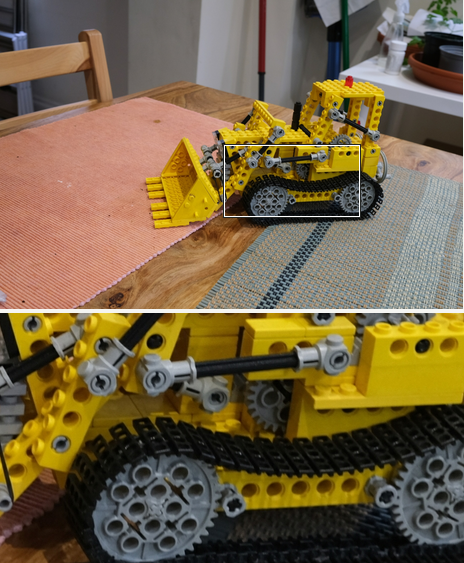
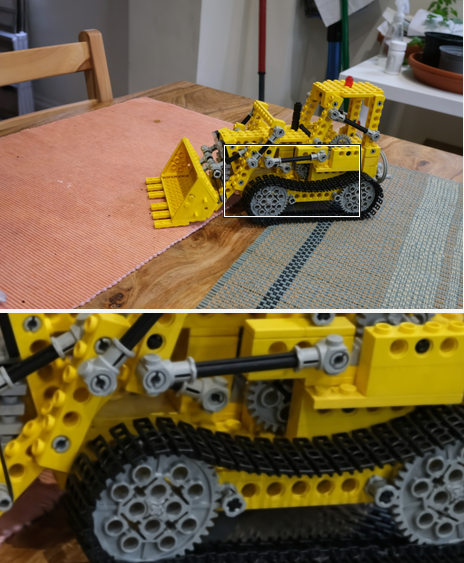
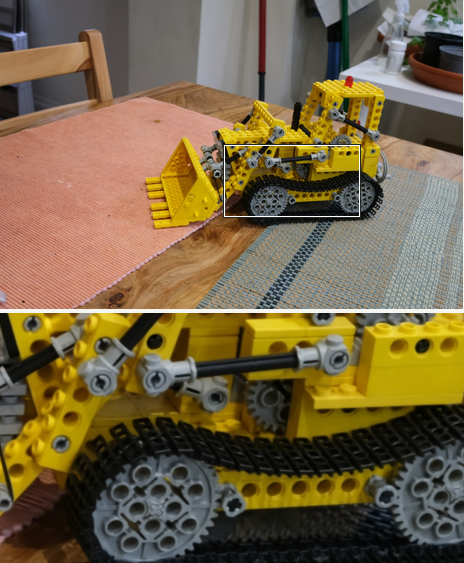
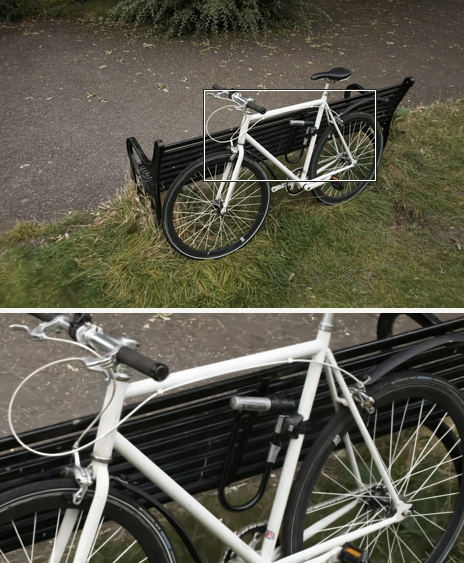
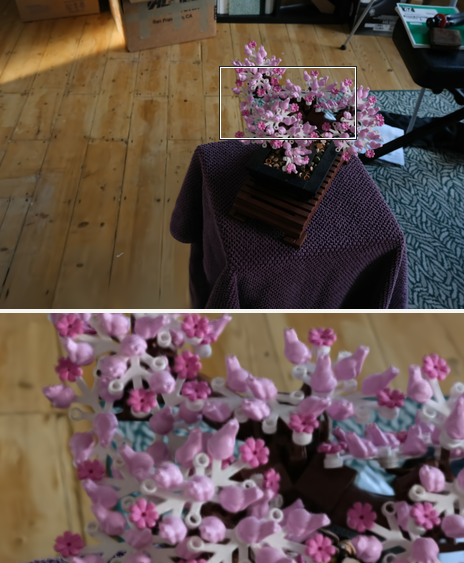
DSCF0912.JPG · Ultrafast 34.20 dB · Quality 34.99 dB
Drag a divider or use the arrow keys. Push the dividers together to compare the outer images.
RTX 4080, seed 42. Ultrafast and Balanced ran for 3,000 steps and Quality for 3,500. Scenes and photographs by Barron et al., CVPR 2022. Mip-NeRF 360 dataset
Reconstructions - animated
Benchmark results
The desktop GPU results average the nine Mip-NeRF 360 scenes equally. Graphdeco evaluation covers 246 held-out views, at quarter resolution outdoors and half resolution indoors. See the RTX 4050 Laptop GPU results on three datasets below.
| GPU / preset | Steps | Train loop | PSNR | SSIM | VGG LPIPS | End VRAM |
|---|---|---|---|---|---|---|
| RTX 4090 24 GB | ||||||
| Ultrafast | 3,000 | 10.51 s | 27.13 dB | 0.7935 | 0.2564 | 5.29 GiB |
| Balanced | 3,000 | 15.91 s | 27.40 dB | 0.8141 | 0.2228 | 2.81 GiB |
| Quality | 3,500 | 22.68 s | 27.90 dB | 0.8285 | 0.1996 | 4.81 GiB |
| Quality+ | 17,044 avg. | 122.66 s | 28.227 dB | 0.8317 | 0.1909 | 4.81 GiB |
| RTX 4080 16 GB | ||||||
| Ultrafast | 3,000 | 17.62 s | 27.13 dB | 0.7936 | 0.2567 | 5.29 GiB |
| Balanced | 3,000 | 25.97 s | 27.39 dB | 0.8143 | 0.2229 | 2.80 GiB |
| Quality | 3,500 | 32.44 s | 27.90 dB | 0.8286 | 0.1997 | 4.80 GiB |
| Quality+ | 17,536 avg. | 216.40 s | 28.225 dB | 0.8316 | 0.1907 | 4.80 GiB |
| Radeon RX 7900 XT 20 GB | ||||||
| Ultrafast | 3,000 | 16.44 s | 27.125 dB | 0.7936 | 0.2569 | 5.41 GiB |
| Balanced | 3,000 | 27.02 s | 27.391 dB | 0.8143 | 0.2229 | 2.85 GiB |
| Quality | 3,500 | 39.47 s | 27.898 dB | 0.8286 | 0.1997 | 4.85 GiB |
| Quality+ | 17,189 avg. | 202.04 s | 28.210 dB | 0.8316 | 0.1909 | 4.85 GiB |
Headless Vulkan, seed 42. Training-loop timing excludes COLMAP reconstruction, loading, initialization, held-out evaluation and export. Quality+ includes its training-view convergence checks. VRAM is sampled at loop end.
4090 fixed-budget CSV4090 Quality+ CSV4080 fixed-budget CSV4080 Quality+ CSV7900 XT fixed-budget CSV7900 XT Quality+ CSV
RTX 4050 Laptop GPU (6 GB)
We tested each preset on 13 scenes on a Dell XPS 14 9440 with a 30 W enforced GPU power limit. Each row averages its completed scenes equally. Mip-NeRF 360 covers nine scenes at quarter resolution outdoors and half resolution indoors. Tanks & Temples covers Train and Truck at half resolution, and Deep Blending covers DrJohnson and Playroom at full resolution.
| Dataset | Preset | Scenes | Steps | Train loop | PSNR ↑ | SSIM ↑ | VGG LPIPS ↓ | Final splats | End VRAM |
|---|---|---|---|---|---|---|---|---|---|
| Mip-NeRF 360 | Ultrafast | 5/9 | 3,000 | 69.54 s | 24.575 dB | 0.6957 | 0.3031 | 1.59M | 3.86 GiB |
| Mip-NeRF 360 | Ultrafast (stream where required) | 9/9 | 3,000 | 90.50 s | 27.112 dB | 0.7935 | 0.2566 | 1.43M | 3.20 GiB |
| Mip-NeRF 360 | Balanced | 9/9 | 3,000 | 139.88 s | 27.395 dB | 0.8143 | 0.2228 | 2.07M | 2.80 GiB |
| Mip-NeRF 360 | Quality | 9/9 | 3,500 | 191.41 s | 27.893 dB | 0.8285 | 0.1996 | 2.10M | 4.77 GiB |
| Tanks & Temples | Ultrafast | 2/2 | 3,000 | 73.91 s | 23.921 dB | 0.8379 | 0.1954 | 1.37M | 3.71 GiB |
| Tanks & Temples | Balanced | 2/2 | 3,000 | 105.40 s | 24.104 dB | 0.8507 | 0.1748 | 1.73M | 2.60 GiB |
| Tanks & Temples | Quality | 2/2 | 3,500 | 123.24 s | 24.466 dB | 0.8579 | 0.1660 | 1.30M | 4.60 GiB |
| Deep Blending | Ultrafast | 2/2 | 3,000 | 51.04 s | 29.890 dB | 0.9036 | 0.2741 | 1.02M | 4.60 GiB |
| Deep Blending | Balanced | 2/2 | 3,000 | 84.99 s | 29.914 dB | 0.9078 | 0.2585 | 1.70M | 2.73 GiB |
| Deep Blending | Quality | 2/2 | 3,500 | 115.19 s | 30.191 dB | 0.9114 | 0.2458 | 1.83M | 4.72 GiB |
Ultrafast exceeded the GPU memory budget during setup on Bonsai, Counter, Kitchen and Room. The stock row averages the scenes that completed with the preset defaults. The “stream where required” row adds the affected scenes, rerun with training images streamed from system RAM. The per-scene CSV records each override and the original capacity error. The trainer also reduces the splat capacity automatically when needed. The CSV lists the requested and effective capacities for each run.
Headless Vulkan, seed 42. Loop times exclude setup, held-out scoring and export. VRAM is process-local GPU memory at loop end. Graphdeco scored RGB8 renders from every eighth registered camera.
Inspect all 39 laptop runs
| Scene | Preset | Test views | Train loop | PSNR ↑ | SSIM ↑ | VGG LPIPS ↓ | Final splats | End VRAM |
|---|---|---|---|---|---|---|---|---|
| Bicycle | Ultrafast | 25 | 61.80 s | 24.591 dB | 0.7029 | 0.3020 | 1.61M | 4.16 GiB |
| Bicycle | Balanced | 25 | 97.37 s | 25.102 dB | 0.7544 | 0.2397 | 2.49M | 2.72 GiB |
| Bicycle | Quality | 25 | 139.60 s | 25.624 dB | 0.7823 | 0.2000 | 2.61M | 4.72 GiB |
| Flowers | Ultrafast | 22 | 71.07 s | 21.473 dB | 0.5697 | 0.3821 | 1.59M | 3.96 GiB |
| Flowers | Balanced | 22 | 111.09 s | 21.724 dB | 0.6018 | 0.3402 | 2.49M | 2.72 GiB |
| Flowers | Quality | 22 | 169.87 s | 22.025 dB | 0.6298 | 0.3020 | 2.55M | 4.72 GiB |
| Garden | Ultrafast | 24 | 84.16 s | 26.786 dB | 0.8246 | 0.1870 | 1.59M | 4.16 GiB |
| Garden | Balanced | 24 | 140.59 s | 27.267 dB | 0.8532 | 0.1347 | 2.26M | 2.73 GiB |
| Garden | Quality | 24 | 203.85 s | 27.774 dB | 0.8688 | 0.1113 | 2.35M | 4.73 GiB |
| Stump | Ultrafast | 16 | 62.41 s | 26.957 dB | 0.7687 | 0.2516 | 1.58M | 3.41 GiB |
| Stump | Balanced | 16 | 100.03 s | 27.331 dB | 0.7923 | 0.2141 | 2.55M | 2.72 GiB |
| Stump | Quality | 16 | 145.81 s | 27.700 dB | 0.8093 | 0.1881 | 2.61M | 4.72 GiB |
| Treehill | Ultrafast | 18 | 68.26 s | 23.070 dB | 0.6125 | 0.3928 | 1.59M | 3.62 GiB |
| Treehill | Balanced | 18 | 109.35 s | 23.088 dB | 0.6415 | 0.3336 | 2.47M | 2.73 GiB |
| Treehill | Quality | 18 | 158.18 s | 23.230 dB | 0.6578 | 0.2895 | 2.71M | 4.72 GiB |
| Bonsai | Ultrafast (streamed retry) | 37 | 107.29 s | 30.730 dB | 0.9349 | 0.2077 | 1.32M | 2.38 GiB |
| Bonsai | Balanced | 37 | 159.84 s | 30.962 dB | 0.9381 | 0.1990 | 1.74M | 2.89 GiB |
| Bonsai | Quality | 37 | 211.27 s | 31.699 dB | 0.9427 | 0.1902 | 1.90M | 4.83 GiB |
| Counter | Ultrafast (streamed retry) | 30 | 129.19 s | 28.098 dB | 0.8954 | 0.2147 | 1.20M | 2.38 GiB |
| Counter | Balanced | 30 | 195.59 s | 28.124 dB | 0.9008 | 0.2031 | 1.47M | 2.89 GiB |
| Counter | Quality | 30 | 247.08 s | 28.749 dB | 0.9081 | 0.1928 | 1.34M | 4.83 GiB |
| Kitchen | Ultrafast (streamed retry) | 35 | 132.54 s | 30.873 dB | 0.9194 | 0.1422 | 1.13M | 2.38 GiB |
| Kitchen | Balanced | 35 | 196.69 s | 31.072 dB | 0.9243 | 0.1307 | 1.52M | 2.89 GiB |
| Kitchen | Quality | 35 | 243.09 s | 31.831 dB | 0.9297 | 0.1242 | 1.22M | 4.83 GiB |
| Room | Ultrafast (streamed retry) | 39 | 97.78 s | 31.434 dB | 0.9138 | 0.2297 | 1.25M | 2.38 GiB |
| Room | Balanced | 39 | 148.39 s | 31.884 dB | 0.9219 | 0.2104 | 1.65M | 2.89 GiB |
| Room | Quality | 39 | 203.93 s | 32.402 dB | 0.9280 | 0.1987 | 1.65M | 4.83 GiB |
| Train | Ultrafast | 38 | 74.51 s | 20.961 dB | 0.7758 | 0.2612 | 1.35M | 3.86 GiB |
| Train | Balanced | 38 | 100.55 s | 21.109 dB | 0.7943 | 0.2385 | 1.65M | 2.60 GiB |
| Train | Quality | 38 | 120.08 s | 21.540 dB | 0.8043 | 0.2268 | 1.25M | 4.60 GiB |
| Truck | Ultrafast | 32 | 73.31 s | 26.880 dB | 0.8999 | 0.1297 | 1.38M | 3.55 GiB |
| Truck | Balanced | 32 | 110.25 s | 27.099 dB | 0.9072 | 0.1111 | 1.81M | 2.60 GiB |
| Truck | Quality | 32 | 126.40 s | 27.392 dB | 0.9114 | 0.1053 | 1.35M | 4.60 GiB |
| DrJohnson | Ultrafast | 33 | 47.51 s | 29.102 dB | 0.8960 | 0.2879 | 0.79M | 4.65 GiB |
| DrJohnson | Balanced | 33 | 86.50 s | 29.298 dB | 0.9028 | 0.2679 | 1.72M | 2.74 GiB |
| DrJohnson | Quality | 33 | 118.65 s | 29.669 dB | 0.9083 | 0.2512 | 1.94M | 4.73 GiB |
| Playroom | Ultrafast | 29 | 54.57 s | 30.677 dB | 0.9113 | 0.2603 | 1.24M | 4.54 GiB |
| Playroom | Balanced | 29 | 83.48 s | 30.529 dB | 0.9127 | 0.2490 | 1.68M | 2.72 GiB |
| Playroom | Quality | 29 | 111.73 s | 30.713 dB | 0.9145 | 0.2403 | 1.73M | 4.72 GiB |
Per-scene laptop measurements (CSV)Laptop and software versionsReproduce the laptop benchmarkTruck timing investigation
Compare the same models on Radeon and GeForce
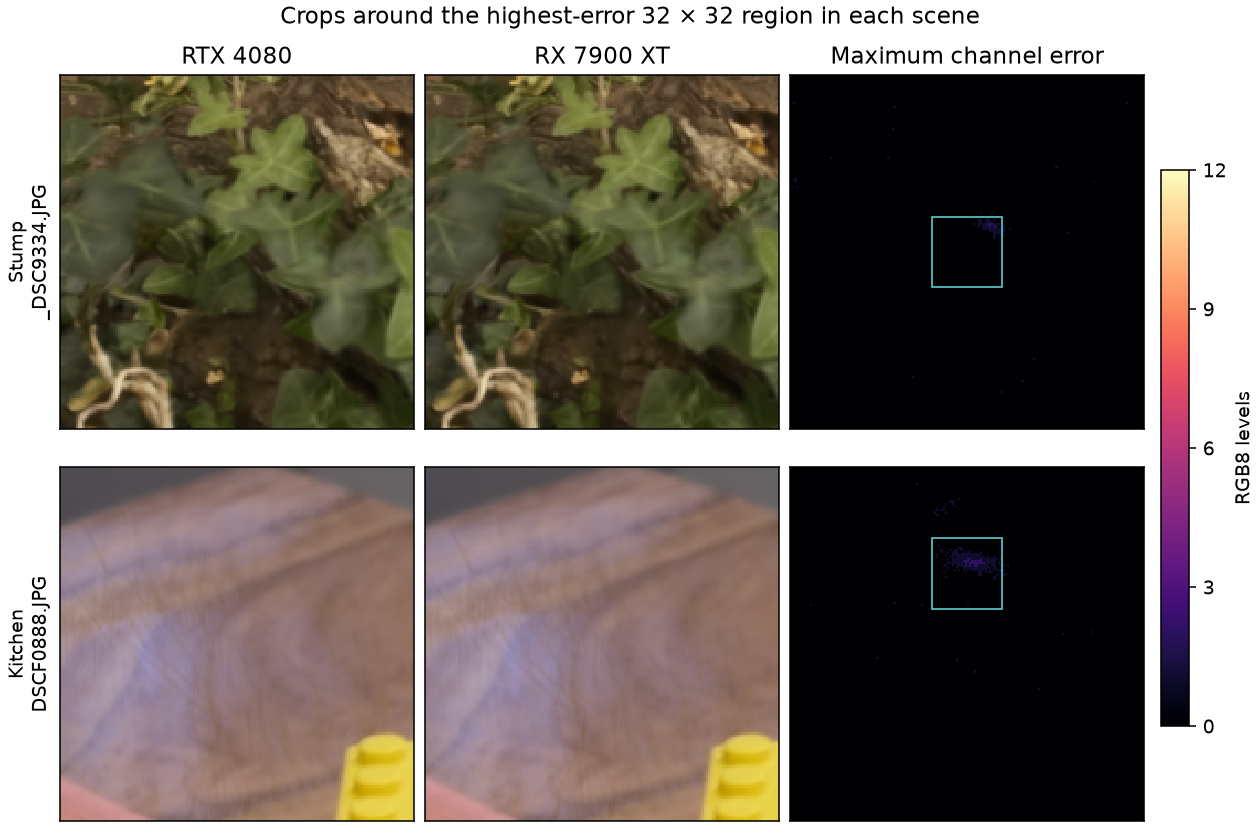
Both cards rendered the same two saved models from 51 held-out cameras using Vulkan. Of 219,272,010 RGB8 channel values, 712 differed by more than one level. The largest difference was 12 levels. Fixed-model measurements
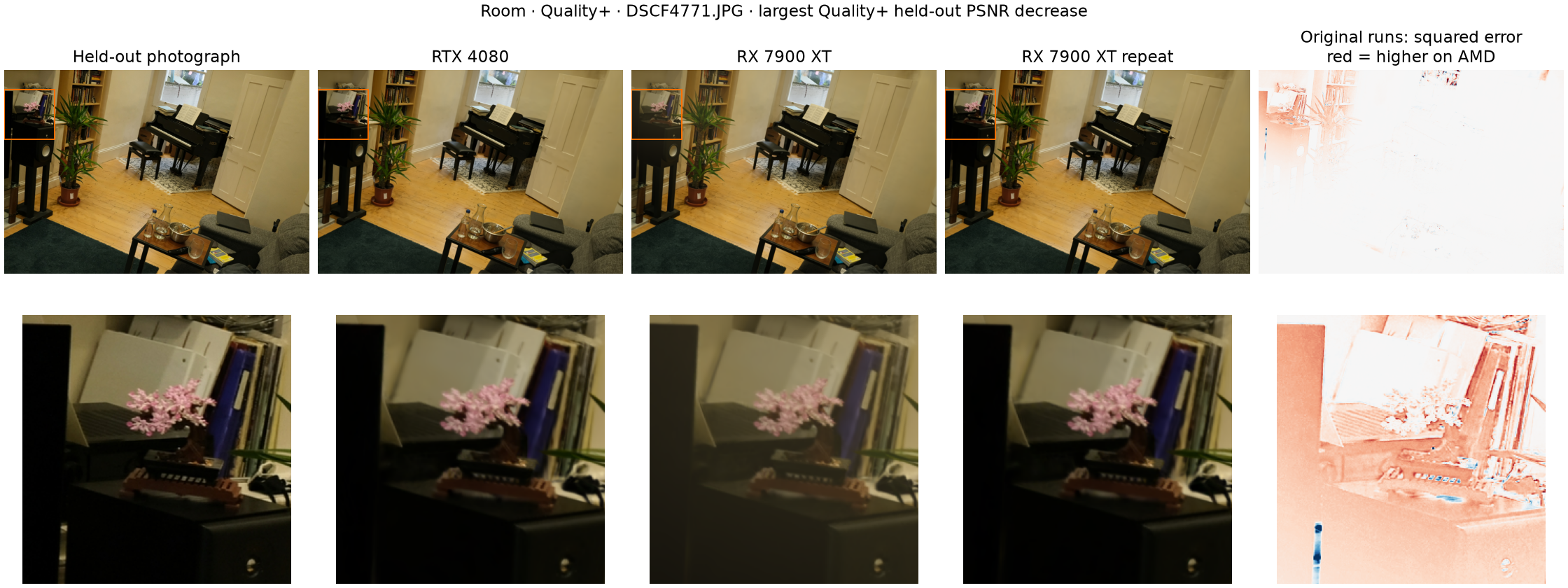
Training fresh models on each GPU produced larger differences. Across the four presets, 11 of 984 matched views differed by over 1 dB in PSNR. The largest gap was 4.26 dB on a Room view at Quality+. Compare that view · Per-view differences
Quality+ convergence on the RTX 4090
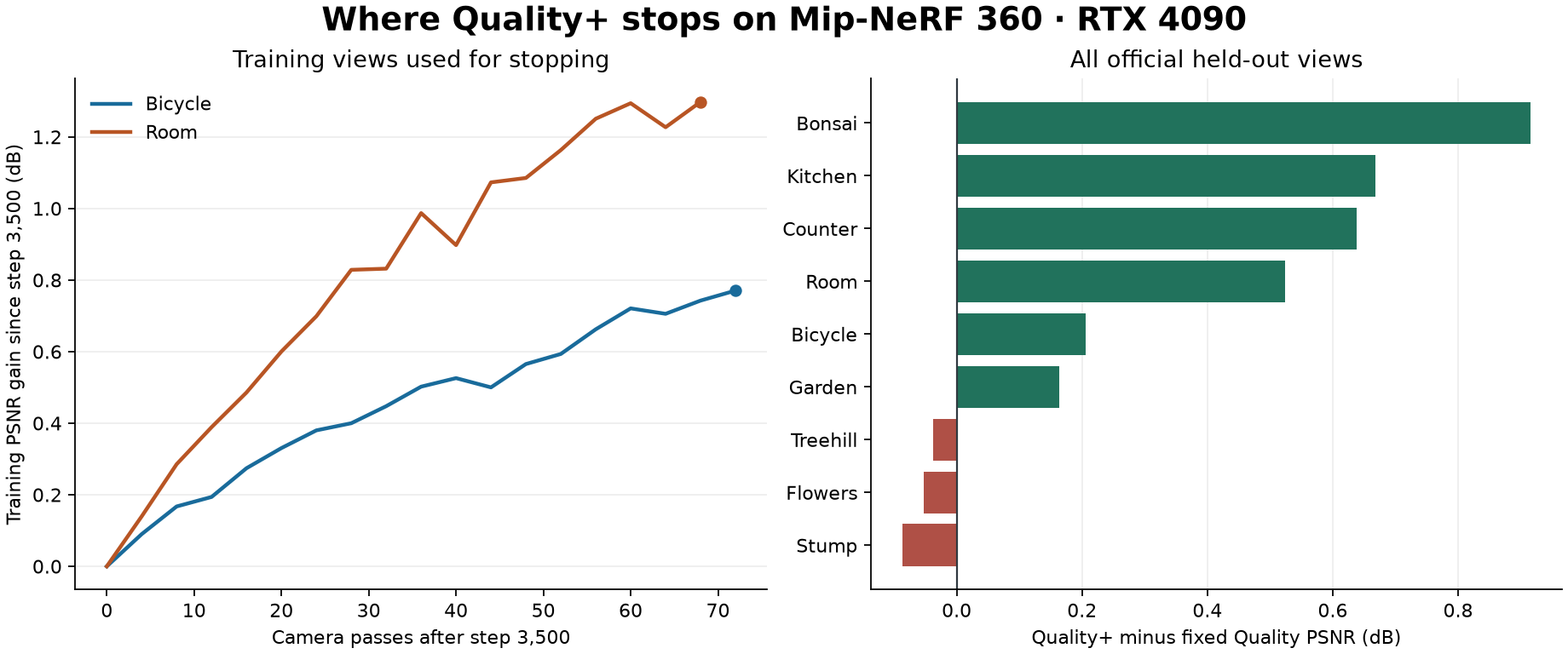
Quality+ stopped between 8,652 and 21,996 steps. Compared with Quality, held-out PSNR rose on six scenes and by 0.326 dB on average. VGG LPIPS improved on all nine.
Compare trainers on the same RTX 4080
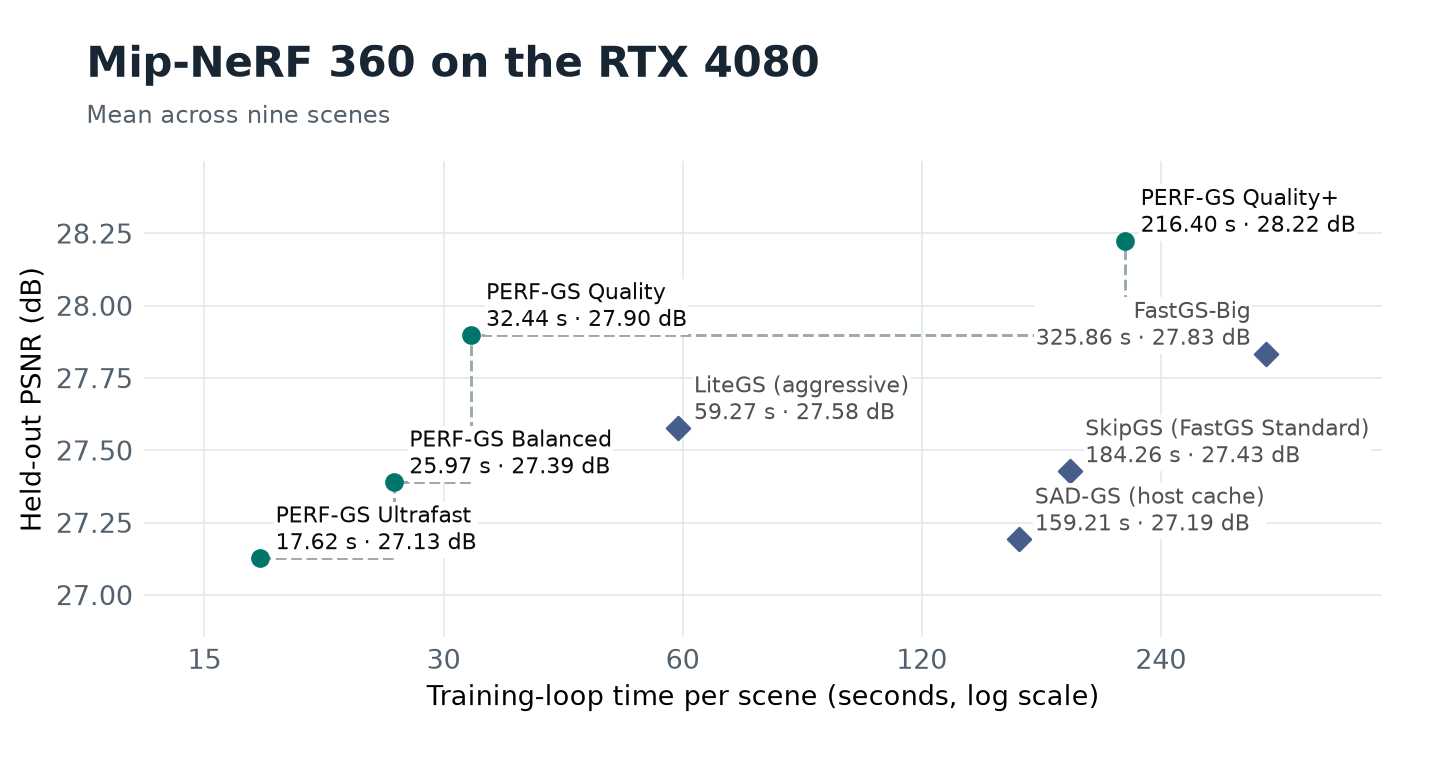
The dashed line connects measured configurations that improve PSNR as more training time becomes available. Method settings and measurements
Train your own scene
Perf-gs was designed to be extremely simple to setup and install.
git clone https://github.com/electronicarts/perf-gs.git
cd perf-gs
py -3.11 -m venv .venv
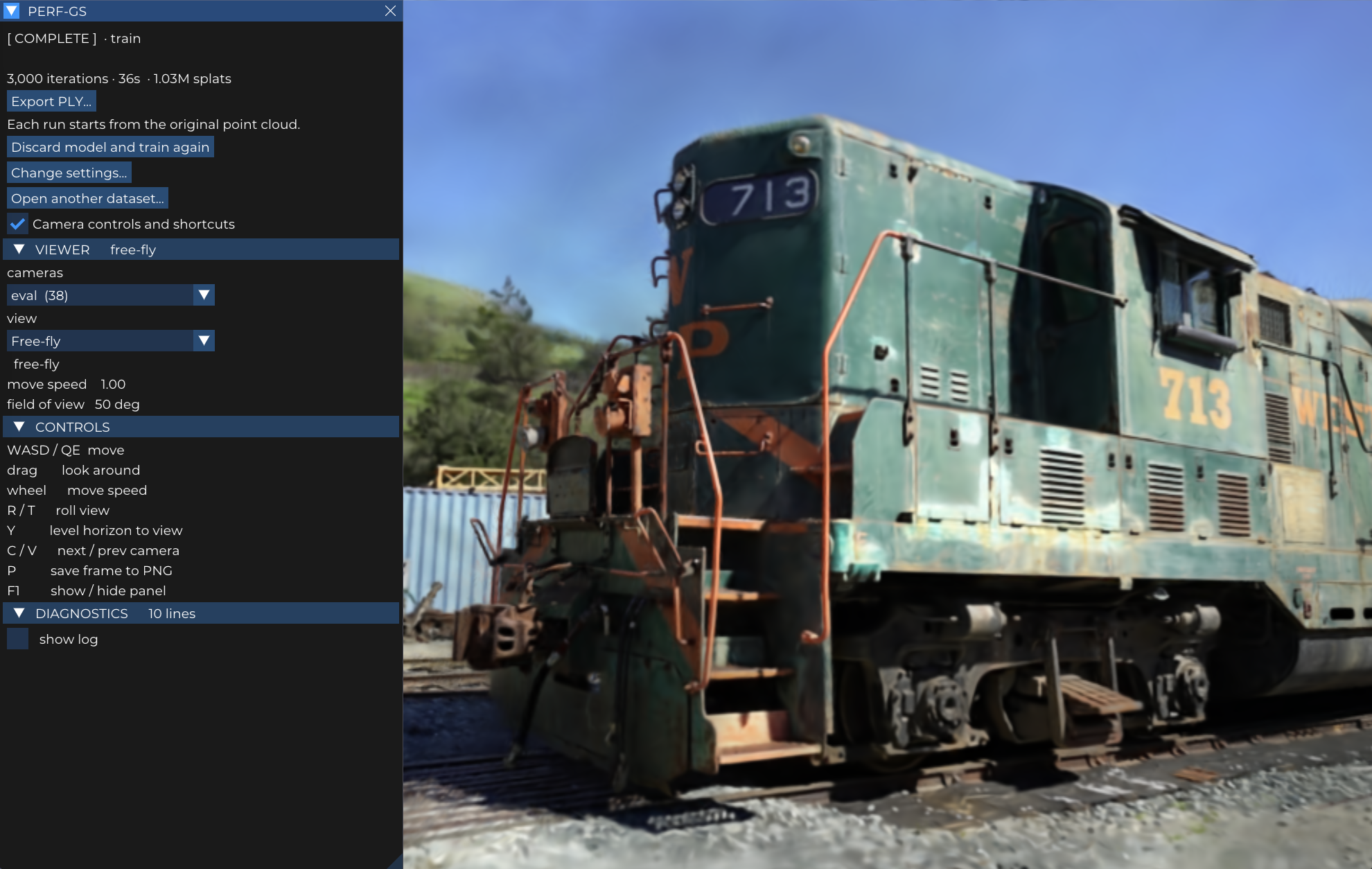
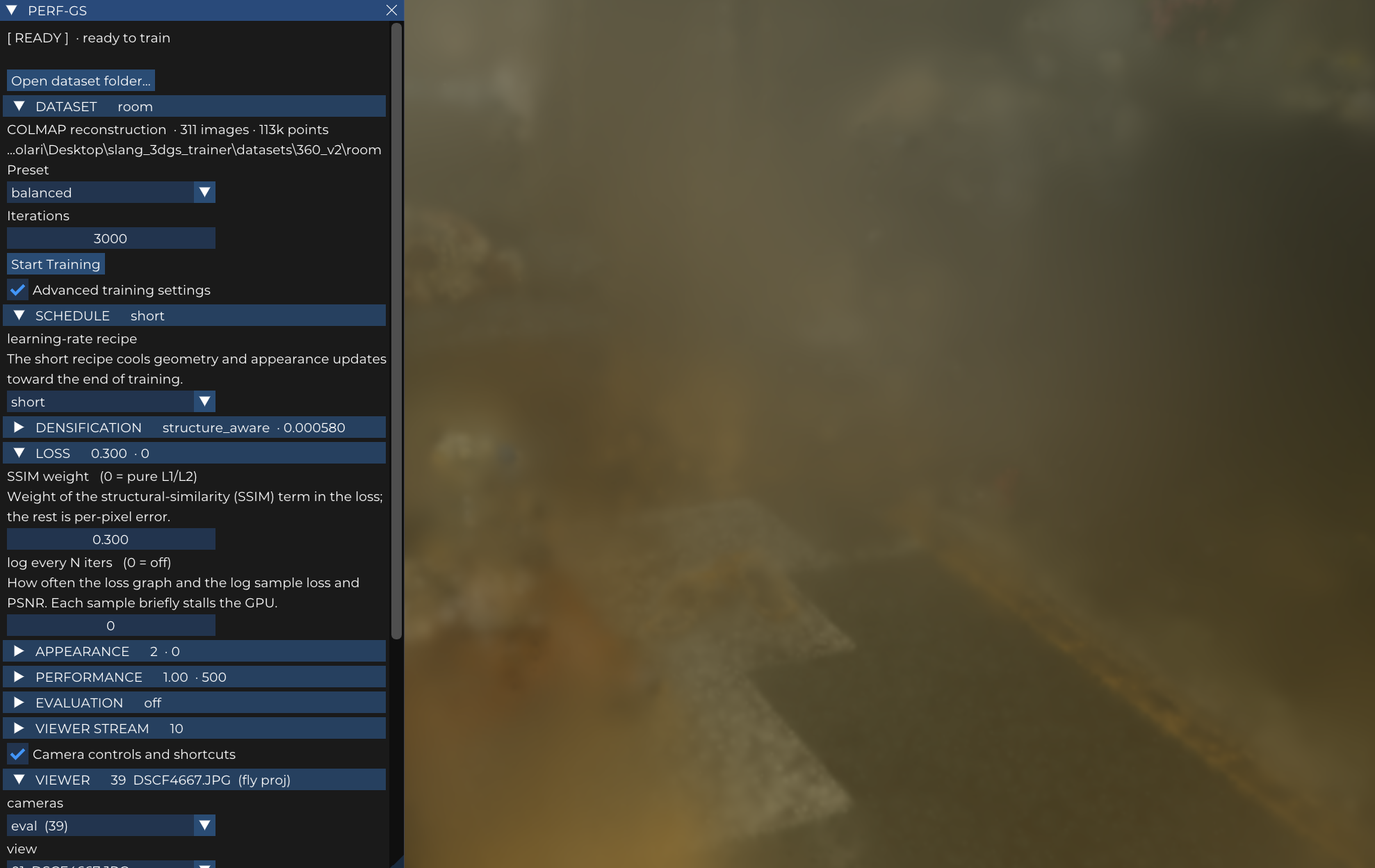
.\.venv\Scripts\python.exe -m pip install -e .python -m trainer.frontend.app --hubOnce the point cloud appears, choose a preset and click Start Training. Explore the result and save it with Export PLY....
Installation and quickstartUltrafast requires NVIDIA's separately licensed research masks. Balanced is the default.
Citation
@software{scolari2026perfgs,
  author    = {Scolari, Stefano},
  title     = {{PERF-GS}},
  year      = {2026},
  publisher = {Electronic Arts},
  url       = {https://github.com/electronicarts/perf-gs}
}